Showing posts with label Fall. Show all posts

10/20/14

PTU Honored Scraps and Arthur Crowe - Autumn Princess

Autumn Princess

This tutorial was written on October 20,2014. 
Any similarities to another tutorial is purely coincidental.
All my tutorial are register with My Free Copyright. 
Please do not claim as your own.
This tutorial writer assumes you have a working 
knowledge of using Paint Shop Pro.
This tutorial was done in Paint Shop Pro9,
but can be adapted to use in other 
Paint Shop Pro versions.


SUPPLIES NEEDED

Tube of choice: I'm using the awesome work of Arthur Crowe.
Please do not use unless you have a license to do so. 
Get Them HERE

Scrapkit of Choice: I am using PTU Honored Scraps - Enchanted Fall
You can purchase it HERE ...Thank You Patty

Template of choice:I am using Millie's PSP Madness Template #50
You can download it HERE...Thanks Millie

background:You can download it HERE...Please do not claim as your own
for personal use only

Filters used:Eye Candy 4000 gradient glow - HERE
Blend - Hard Light

Font for Name is Ming Li U
Copy write is always done in Pixelette  HERE

Drop shadow use through out H-2/V-2/O-60/B-6.85

Please leave a thank you when you downloading for supplies.

my tag is just a guide...please use your imagination 
and make the tag your own you do not have to 
use any of the supplies I used.


     LET'S BEGIN

Open up Template and ShiftD and close original...delete 
copyright layer/close all layers/open background and paste
in center of canvas

On the following raster layers follow these directions...

activate large circle layer/copy/paste paper of choice/resize
paper/selections/invert on circle layer/delete on paper layer
merge down/keep activated/copy/paste close up tube 2/delete on
tube layer/add drop shadow to paper and tube

activate rounded rectangle layer/copy/paste paper of choice resize 
paper/selections/invert on rectangle layer/delete on paper layer
merge down/add drop shadow

activate 2nd rectangle layer/copy/paste paper of choice resize paper
selections/invert on rectangle layer/delete on paper layer/merge 
down/add drop shadow

activate medium circle layer/leave this layer as is/copy/paste close
up tube/see tag for position/delete on tube layer/add drop shadow

activate square layer/leave this layer as is/copy/paste main tube
place on top of square layer/add drop shadow

add any other elements you wish to use/resize if needed/add drop shadow
to each element/place where they will look best

move word art to where it will look best on your tag

add your watermark and copyright credits/give it a slight gradient 
glow.....now give your tag to a friend.

You're done...thank you for trying my tutorial
please send me a copy so that I can show case it on my blog

1/9/13

PTU Hungry Hills Scraps and Barbara Jensen

Glorious Autumn
This tutorial was written on January 9,2012.
Any similarities to another tutorial is purely coincidental.
All my tutorial are register with My Free Copyright.
Please do not claim as your own.
This tutorial writer assumes you have a working
knowledge of using Paint Shop Pro.
This tutorial was done in Paint Shop Pro9,
but can be adapted to use in other
Paint Shop Pro versions.


SUPPLIES NEEDED
Tube of choice: I'm using the awesome work of Barbara Jensen.
Please do not use unless you have a license to do so.
You can get her tubes HERE
Scrapkit of Choice: I am using Hungry Hills PTU Scrapkit Blaze
You can purchase it HERE ...Alison
Template of choice:I am using Additive Pleasures Winter #99
You can download it HERE...Thank you Tamie
Mask of Choice: I am using Yez Mask #55
You can download it Here...Thank you Yez
Filters used:Eye Candy 4000 gradient glow - HERE
Font for Name is Prime Script
Copy write is always done in Pixelette  HERE

Drop shadow use through out H-2/V-2/O-50/B-5.00
Please leave a thank you when you downloading for supplies.

my tag is just a guide...please use your imagination
and make the tag your own you do not have to
use any of the supplies I used.


     LET'S BEGIN
Open up Template and ShiftD and close original...delete
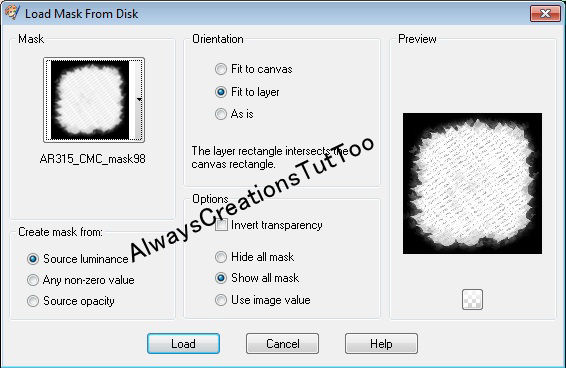
copyright layer/close all layers/copy/paste paper of choice
layers/load/save mask/locate mask/set with these settings

below/click ok
On the following raster layers follow these directions...
activate lg circle layer/copy/paste paper of choice/resize
selection/invert/on lg circle layer/delete on paper layer/
merge down/add drop shadow/copy/paste elements of choice
resize/add drop shadow to both
activate long rectangle layer/copy/paste paper of choice/resize
selection/invert/on long rectangle layer/delete on paper layer
merge down/copy/paste elements of choice/resize/add drop shadow
activate thin rectangle layer/copy/paste paper of choice/resize
selection/invert/on thin rectangle layer/delete on paper layer
merge down/add drop shadow
activate square layer/copy/paste paper of choice/resize/selections
invert/on square layer/delete on paper layer/merge down/copy/paste
element of choice/resize/add drop shadow
activate rectangle layer/copy/paste paper of choice/resize
selection/invert/on rectangle layer/delete on paper layer
merge down/copy/paste element of choice/resize/add drop shadow
activate small circle layer/copy/paste paper of choice/resize
selection/invert/on small circle layer/delete on paper layer/merge
down/keep activated/copy/paste tube of choice/resize so the upper
part is within the circle/delete on tube/duplicate/on original
layer/blend/screen/place duplicate underneath original layer/add
drop shadow to both/leave circle frame as is/add drop shadow
activate small square layer/copy/paste paper of choice/resize
selection/invert/on small square layer/delete on paper layer/merge
down/keep activated/copy/paste tube of choice/resize so the upper
part is within the square/delete on tube/duplicate/on original
layer/blend/overlay/place duplicate underneath original layer/lower
opacity to 80%/add drop shadow to both/leave square frame as is/add
drop shadow
add any other elements to make your tag your own/add drop shadow on
each element/resize your tag/add wordart of choice from kit/resize
add drop shadow
copy/paste main tube/resize if needed/place where it will look best
add drop shadow to tube

add your watermark and copyright credits/give it a slight gradient
glow ...now give your tag to a friend.
You're done...thank you for trying my tutorial
please send me a copy so that I can show case it on my blog
send to....
riggsbee53@gmail.com

9/12/11

PTU Hungry Hills and Pinuptoons


Autumn Leaves

This tutorial was written on September 10th 2011. 
Any similarities to another tutorial is purely coincidental.

All my tutorial are register with My Free Copyright. 
Please do not claim as your own.
This tutorial writer assumes you have a 
working knowledge of using Paint Shop Pro.

This tutorial was done in Paint Shop Pro9,
but can be adapted to use in other

Paint Shop Pro versions.


                                                                     SUPPLIES NEEDED


                                Tube of Choice: I am using the awesome artwork of Pinuptoons..
                      You can purchase his tubes HERE...you will need a closeup and regular tube
                                            Please do not use without a license to do so


                     Scrapkit of Choice: I am using a Sarah Hungry Hills PTU Scrapkit- Subtle Autumn .
                                         You can purchase it HERE....Thank you Sarah


                              Template of Choice: I'm using a template by Blissfully Beth #9. 
                                        You can get it HERE. Thank you  for the Share Beth


                                 Mask of Choice: I'm using Creative Misfit Autumn Collection. 
                               Place in your mask folder. You can get it HERE. Thanks Aqua

                              Filter Used:Eye Candy 4000-Gradient Glow...You can get it HERE
                            Gradient: Autumn Gradient from Eleven Sword...You can get it HERE

                                         Font for name is HT Trattona and copy write is always 
                                                   done in Pixelette ... Get them HERE


                                                         animation fallen leaves...Here


                                              Drop shadow use through out H-2/V-2/O-50/B-5.00
                                      Please leave a thank you when you downloading for supplies.

                                       my tag is just a guide...please use your imagination and make
                                    the tag your own you do not have to use any of the supplies I used.

                                                                                LET'S BEGIN
                        Open template/Image resize all layer to 600x600/shiftD/close original template.
                     Remove background and credits.Close out every layer. Choose paper of choice/
                      paste underneath all layers.Go to layers/load/save mask/load mask from disk/
                              find your mask of choice and paste with these setting.merge group


Do the following task to layers 1-7/merge down after each task and add a drop shadow

copy/paste paper of choice/go to the layer/invert/go to paper layer and delete

put the tree behind layer 6/add a drop shadow.

add any other elements you wish to use/make sure you add a drop shadow to each element.
place your main tube where you want it/add drop shadow.(see my tag if needed)

Resize if needed/Add your copyright and watermark-(I put a slight gradient glow on mine)


now it's time to animate

copy merge/paste your tag into animation shop/open up your animation leaves into
animation shop/duplicate your tag with the same number of layers as the animation
you should have 27 layers/edit/select all/animation/frame properties/30
save as gif

thank you for trying my tutorial..please send me a copy of what you did
so I can showcase it...riggsbee53@gmail.com

9/9/11

PTU Mythical Designs and Jennifer Janesko

Autumn Glory

This tutorial was written on September 9th 2011.
Any similarities to another tutorial is purely coincidental.
All my tutorial are register with My Free Copyright.
Please do not claim as your own.
This tutorial writer assumes you have a
working knowledge of using Paint Shop Pro.
This tutorial was done in Paint Shop Pro9,
but can be adapted to use in other
Paint Shop Pro versions.


SUPPLIES NEEDED

Tube of Choice: I am using the awesome artwork of Jennifer Janesko..
You can purchase her tubes
HERE...you will need a closeup and regular tube
Please do not use without a license to do so

Scrapkit of Choice: I am using a Mythical Designs PTU Scrapkit- Autumn Glory.
 You can purchase it
HERE....Thank you Sally

Template of Choice: I'm using a template by Essence of Creativity #38. You can get it HERE.
Thank you  for the share Yvette

Mask of Choice: I'm using Creative Misfit Autumn Collection. Place in your mask folder.
You can get it
HERE. Thanks Tina

Filter Used:Eye Candy 4000-Grandient Glow...You can get it HERE
Font for name is Monika and copy write is always done in Pixelette ...
Get them
HERE

Dropshadow use througout H-2/V-2/O-50/B-5.00
Please leave a thank you when you downloading for supplies.

my tag is just a guide...please use your imagination and make the tag your own
you do not have to use any of the supplies I used.


     LET'S BEGIN

Open template/Image resize all layer to 615x615/shiftD/close original template.
Remove background and credits.Close out every layer. Choose paper of choice/
paste underneath all layers.Go to layers/load/save mask/load mask from disk/
find your mask of choice and paste with these setting.merge group


activate circle layer/copy/paste paper of choice/
go to circle layer/invert/go to paper layer 
and delete/merge down
activate square2 layer/copy/paste paper of choice
go to square2 layer/invert
go to paper layer and delete/merge down
activate square1 layer/copy/paste paper of choice
go to square1 layer/invert
go to paper layer and delete/merge down

keep activated/copy paste your close up
tube on top of square1 layer/add drop shadow 

and change blend mode to hard light.
activate rectangles layer/copy/paste paper of choice
go to rectangles layer/invert
go to paper layer and delete/merge down
add any elements you wish to use
make sure you add a drop shadow to each element.

place your main tube where you want it

add drop shadow.(see my tag if needed)
Add your copyright and watermark-
(I put a slight gradient glow on mine)
for the finish touch I took the sparkles 

and copy/paste on top of the tag
now it's ready to give to a friend

thank you for trying my tutorial..please send me a copy of what you did
so I can showcase it..   
riggsbee53@gmail.com

8/31/11

FTU Kelly J and Zindy Nielsen

Blessings Overflowing

This tutorial was written on August 31th 2011.
 Any similarities to another tutorial is purely coincidental.
All my tutorial are register with My Free Copyright.
Please do not claim as your own.
This tutorial writer assumes you have a
working knowledge of using Paint Shop Pro.
This tutorial was done in Paint Shop Pro9,
but can be adapted to use in other
Paint Shop Pro versions.

SUPPLIES NEEDED
Tube of Choice: I am using the awesome artwork of Zindy Nielsen
You can purchase his tubes HERE...
Please do not use without a license to do so

Scrapkit of Choice: I am using a Autumn Dreams by Kelly J. 
Thank you Kelly J

Template of Choice: I'm using a template by Wild Creationz #20.
You can get it HERE. Thank you  for the Share

Mask of Choice: I'm using Zuzzanna #50. Place in your mask folder.
You can get it
HERE. Thanks

Font for name is Scriptina and copy write is always done in Pixelette ...
Get them
HERE

Drop shadow use throughout H-2/V-2/O-50/B-5.00
Please leave a thank you when you downloading for supplies.

my tag is just a guide...please use your imagination and make the tag your own
you do not have to use any of the supplies I used.


LET'S BEGIN
Open template/shiftD/close original template.Remove background and credits.Close
out every layer. Choose paper of choice/paste underneath all layers. Go to layers/
load/save mask/load mask from disk/find your mask of choice and paste with these
setting.merge group.


activate dark grey rectangle.Copy/paste paper of choice.go to selection/ invert rectangle
layer and then go to paper layer and delete/ merge down.
activate left rectangle frame/Copy/paste left mini tag.activate right rectangle frame/
copy/paste right mini tag
activate circle layer/Copy/paste paper of choice.go to selection/ invert circle
layer and then go to paper layer and delete/ merge down/add drop shadow/leave activated
copy/paste tube of choice/resize to circle/leave circle frame as is
add any elements you wish to use/make sure you add a drop shadow to each element.
either add the word art or use one of your own
Add your copyright and watermark-(I put a slight gradient glow on mine)
and give your tag to a friend
thank you for trying my tutorial..please send me a copy of what you did
so I can showcase it   
...riggsbee53@gmail.com

PTU Scraps by Dmg and Pinuptoons

Autumn Blessings

This tutorial was written on August 31th 2011.
Any similarities to another tutorial is purely coincidental.
All my tutorial are register with My Free Copyright.
Please do not claim as your own.
This tutorial writer assumes you have a
working knowledge of using Paint Shop Pro.
This tutorial was done in Paint Shop Pro9,
but can be adapted to use in other
Paint Shop Pro versions.


SUPPLIES NEEDED
Tube of Choice: I am using the awesome artwork of Pinup Toons..
You can purchase his tubes HERE...
Please do not use without a license to do so

Scrapkit of Choice: I am using a Scraps by Dmg PTU Scrapkit
 Happy Fall y'all.
 Thank you Natalie

Template of Choice: I'm using a template by me #79.
You can get it HERE. please leave a thank you

Mask of Choice: I'm using Dark Yarrow Mask #10.
Place in your mask folder.
You can get it
HERE. Thanks

Font for name is PMingLiU-ExtB and copy write is always done in Pixelette ...
Get them
HERE

Dropshadow use througout H-2/V-2/O-50/B-5.00
Please leave a thank you when you downloading for supplies.

my tag is just a guide...please use your imagination and make the tag your own
you do not have to use any of the supplies I used.This is a easy tag..great for beginners.

     LET'S BEGIN
Open template/shiftD/close original template.Remove background and credits.Close
out every layer. Choose paper of choice/paste underneath all layers. Go to layers/
load/save mask/load mask from disk/find your mask of choice and paste with these
setting.merge group.If you want to make your mask darker/duplicate several times
mergeing down each time you duplicate.


Change the color of the Twirl layer to match your kit.Add a drop shadow.
activate recangle1 layer.Copy/paste paper of choice.go to selection/ invert rectangle
layer and then go to paper layer and delete/ merge down.close this layer
activate circle layer. Copy/paste paper of choice.go to selection/ invert circle
layer and then go to paper layer and delete.merge down/cclose this layer
On rectangle2 layer/Copy/paste paper of choice.go to selection/ invert circle
layer and then go to paper layer and delete.merge down/close this layer
open rectangle layer1/copy/paste tree/resize and add drop shadow
open circle layer/copy frame of choice and paste on top of circle layer/resize
add drop shadow
Copy/paste buttom 2 on top of frame layer/resize to fit/add drop shadow
add any other elements to make your tag look like fall
copy/paste tube of choice/resize and add drop shadow(see my tag if needed)
Add your copyright and watermark and give your tag to a friend
thank you for trying my tutorial..please send me a copy of what you did
so I can showcase it   
...riggsbee53@gmail.com